This post is for business owners whose best leads call them, and it’s about fixing Google Ads call tracking so Google learns which calls were real. For many ad accounts, the phone rings, the call ends, and Google never learns if that call was a real job or a wrong number.
We’ve run Google Ads accounts for 15+ years, with 16.92X average ROAS and 31,300+ conversions for clients in the last 12 months. And the leak we find most often in new accounts isn’t a bad keyword. It’s the phone.
Here’s the big idea: tracking doesn’t end when the phone rings. Google Ads only maximizes your lead quality when you send it what happened next.
In this article we’ll walk through:
- Why Google needs to know what happened on the call
- The best way to send phone leads back to Google (automatic import first)
- When manual import makes sense (last resort)
- What we check every week while an account is being tuned
Not sure your calls are tracked at all? Book a quick call and we’ll check your Google Ads call tracking with you for free.
WHY DOESN’T GOOGLE ADS CALL TRACKING TELL GOOGLE WHICH CALLS WERE GOOD?
Because Google can’t tell a spam call from a $10K job. It only sees that the phone rang.
Google’s bidding learns from the conversions you give it. If all it sees is rings, it optimizes for rings, not customers. You get more calls, but that might not mean more jobs.
Basic Google Ads call tracking counts the call. It doesn’t grade it. That’s why, for us, the highest priority behind having call tracking is pushing feedback on those calls back into Google Ads. Call tracking on its own tells YOU what happened. Pushing it back tells GOOGLE.
When that loop is missing, two things go wrong at once:
- You can’t prove which ads bring in real work.
- Google keeps “optimizing” toward whatever’s easiest to get (i.e. more of the calls that never turn into anything).
We check tracking and review calls every single day in the accounts we manage. You can learn more about that that daily routine in What It Takes to Get 16.92X ROAS in Your Google Ads.
HOW DO YOU GET CALL TRACKING DATA BACK INTO GOOGLE ADS AUTOMATICALLY?
Simple: build an automatic import loop, and Google gets all the data it needs to keep learning on its own.
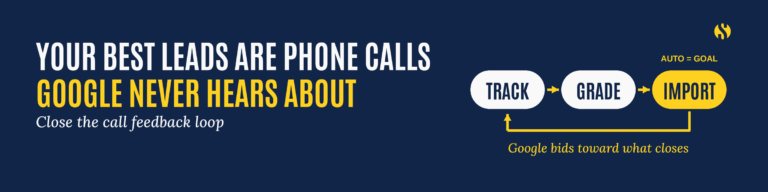
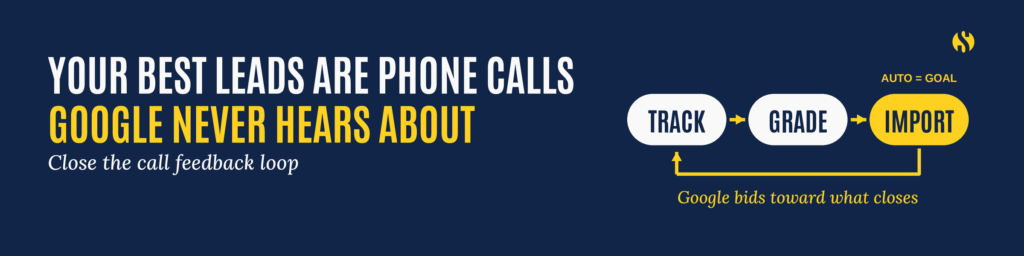
Here’s how the feedback loop works:
- Call tracking catches the call. Call tracking software gives each ad its own tracked number and records the call. We use CallRail to do this.
- The lead gets graded. Your team (or your CRM) marks whether the call was a real lead, and ideally whether it turned into a job.
- The result flows into Google Ads. Your call tracking or CRM system sends that outcome back to Google Ads as a conversion. Google matches the call using details like the caller’s number and the call’s start time.
- Google bids toward what closes. Over time, the algorithm finds more people who look like your real customers.
This is where Google Ads conversion tracking and enhanced conversions for leads come in: they let Google tie the lead back to the ad that drove it.
If you already have a call tracking or CRM system, the first question is simple: does it integrate with Google Ads? If it does, that’s the most important thing. If you’re shopping for call tracking software, make that integration a must-have.
What “connected” looks like:
- Calls from ads and from your website show up as conversions in Google Ads.
- Form fills show up as conversions.
- Emails and other leads your team logs make it in too.
- Quality gets passed along, so Google knows a good lead from a bad one.
One gotcha: if someone copies a Google forwarding number and dials it by hand, Google can’t record that call. That’s one more reason to rely on a real call tracking setup.
Want us to set up the automatic loop for you? Book a call with our team.
WHEN SHOULD YOU USE MANUAL OFFLINE CONVERSION TRACKING?
Only as a last resort.
Manual offline conversion tracking means someone exports your leads and uploads them into Google Ads by hand. It works (if your UTMs have all the right data in them…). But it’s slow, it’s easy to forget, and every week it slips is a week Google learns nothing.
Use it when there’s no other option:
- Your call tracking or CRM doesn’t integrate with Google Ads. (P.S. – FIND A NEW CRM. This is holding your business back from growing. It’s worth the effort of changing. Trust 15 years of experience on this.)
- You’re between systems and need a stopgap.
If you have to do it, do it right:
- Pick one person who owns the process.
- Upload on a fixed schedule, every week.
- Include only real leads, and mark which ones turned into jobs.
- Plan your move to an automatic setup. Manual import shouldn’t be the method forever.
WHAT GOOGLE ADS CALL TRACKING CHECKS DO WE RUN EVERY WEEK?
For accounts we’re optimizing, we reconcile manually every week. Automatic import is the goal, but we don’t take it on faith.
In the first 1 to 2 months of optimizing an account, we verify every week that real conversions made it into Google. Here’s the loop:
- Pull the lead count from the source. Calls from call tracking, form fills from the landing page, emails from the inbox.
- Pull the conversion count from Google Ads. Same date range.
- Compare them. If call tracking shows five calls and the landing page shows three form fills, Google should show all eight.
- Confirm with the client or sales team. Did all of those leads reach the right end target?
- Grade the leads. Good or bad. A simple thumbs up or down from the sales team is enough to start. Eventually, you want to report which leads became closed deals too. That helps Google find not just good calls but new business.
- Fix gaps the same week. A broken tag or missing integration costs you leads AND has Google optimizing on the wrong data every day it isn’t fixed.
This is also where the loop pays off for your own team. The same call recordings that tell Google what’s good tell you whether your team handled the call well. And it keeps everyone honest about the number that matters: the highest-volume lead source doesn’t help you if you don’t close those leads.
HOW DO YOU KNOW YOUR GOOGLE ADS CALL TRACKING IS WORKING?
You’ll see it in a few places:
- The numbers match. Conversions in Google Ads line up with what your team saw come in.
- Lead quality improves. Over time, more of the calls are the right callers for the right jobs.
- Google bids toward leads that close, instead of the cheap calls that never go anywhere.
READY TO MAKE SURE GOOGLE HEARS ABOUT YOUR BEST LEADS?
If your best leads come by phone, Google needs to hear about them. Get automatic import in place, keep manual import as the backup, and check every week while you’re tuning the account.
We’ll check whether your calls, forms, and emails make it into Google Ads, show you where leads are slipping through, and give you a clear plan to close the loop. Many clients come to us after months of guessing which ads work. That’s when you need an agency partner.
FREQUENTLY ASKED QUESTIONS
How do I set up Google Ads call tracking?
Use call tracking software that assigns tracked numbers to your ads and website, then connect it to Google Ads so each call is recorded as a conversion.
What is offline conversion tracking in Google Ads?
Offline conversion tracking sends results that happen off your website, like phone calls and closed jobs, back into Google Ads so it can optimize for real customers.
Should I import calls into Google Ads automatically or manually?
Automatically, whenever your call tracking or CRM supports it. Manual import is a last resort for systems that can’t connect.
How often should I check that conversions are reaching Google?
Every week while an account is being tuned, especially in the first 1 to 2 months. We also check recordings daily in the accounts we manage.
Does Google Ads know if a call turned into a sale?
Not unless you tell it. Google sees the call. You have to send back whether it was a good lead or a closed job.
What counts as a conversion for a local service business?
A real lead: a qualified phone call, a form fill, or an email asking for your service. Closed jobs are even better to send back when you can track them.
Enjoy content from Strategy Marketing? Make us one of your preferred sources on Google.